

Description
Your Business WiFi Expert Within Reach
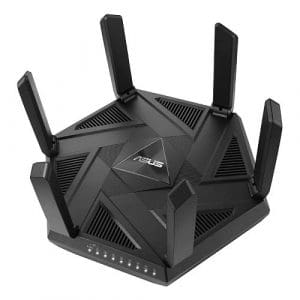
The ASUS ExpertWiFi EBM68 provides a fast, secure, and scalable network with rich features tailored for mid-sized businesses. Whether used independently or extended with other ASUS ExpertWiFi solutions, the ExpertWiFi EBM68 can easily adapt to your business network needs.
- Small and Home Offices – For remote employees or those running small businesses, ExpertWiFi provides stable and reliable internet connections. And with comprehensive VPN protocols, users can access their networks with site-to-site VPNs for encrypted office or home network connections, easily and securely.
- Retail – ExpertWiFi provides an all-new platform for innovative business services. Brand information and advertising can be promoted via a Guest Portal, to engage with your customers in different ways.
- Hospitality – ExpertWiFi networking products are prepared to scale to the customers’ needs. The ExpertWiFi series can support up to 12 node connections, so a businesses can greatly expand the size of its network when using ExpertWiFi devices.
- Clinic – To make sure all data and information is secured, the ExpertWiFi series offers Commercial-grade network security through a free subscription to ASUS AiProtection Pro and Safe Browsing features.
Stable Business Operation
VLAN
ExpertWiFi supports virtual local area network (VLAN) management. VLAN management enables an easy, fast and flexible way to segment the network wired and wirelessly. You can dedicate an Ethernet port that provides additional security for your business.
ExpertWiFi supports virtual local area network (VLAN) management. VLAN management enables an easy, fast and flexible way to segment the network wired and wirelessly. You can dedicate an Ethernet port that provides additional security for your business.
Dual & Backup WAN
The EBM68 provides reliable and stable internet access for business owners. With the dual WAN failover solution, businesses can easily switch to a backup WAN connection to minimize downtime during a network interruption, ensuring their POS system remains operational. In addition, business owners can use their smartphone as a backup internet provider by plugging it into the router's USB port. No complicated setup is needed — just plug it in and use it.
The EBM68 provides reliable and stable internet access for business owners. With the dual WAN failover solution, businesses can easily switch to a backup WAN connection to minimize downtime during a network interruption, ensuring their POS system remains operational. In addition, business owners can use their smartphone as a backup internet provider by plugging it into the router's USB port. No complicated setup is needed — just plug it in and use it.
Easy setting for your business
Separate profile and usage
A Self-defined Network (SDN) provides up to five SSIDs to separate and prioritize devices for various business usages and network alternatives. Network segments can be made for employees, guest portals, guest networks, scheduled networks, IoT networks and VPN networks.
Scenario explorer
The scenario explorer can guide network novices through the network setup process. Just click on a scenario that suits your business the most, and it will customize your router’s settings to complete the process in just a few steps.
Create your style
Guest portals can be tailored to meet your business needs, with custom portal types, branding and visual templates to fit particular business styles and to engage with customers in different ways.
Manage all devices at once
ExpertWiFi series lets business owners with multiple offices or workplaces connect all network devices under one administrator account. In addition, they can easily manage various network devices in the ASUS ExpertWiFi mobile app anywhere, anytime.
Extendable and Scalable
ExpertWiFi networking products are prepared to scale to the customer’s needs, whether it’s a small business or a large factory. With support for up to 12 node connections, companies can significantly expand their network size by adding more ExpertWiFi devices. Additionally, the EBM68 can comfortably support up to 100 active devices per node.
Control your business network all in one app
With the ASUS ExpertWiFi app, you can set up and manage your business network easily and conveniently.
Commercial-grade network security
Site-To-Site VPN
Site-to-site VPNs are useful for companies that prioritize private, protected traffic. They are particularly helpful for organizations that have multiple locations spread out over great distances, such as chain stores and overseas branch offices. Using a site-to-site VPN can quickly help you build up your private network to connect all these places and to share information or resources between intranets from different locations.
Protect Your Business
ASUS AiProtection leverages powerful cybersecurity solutions and cloud data centers from Trend Micro ™ to shield your business and all connected devices from cyber threats — with no subscription fee!
One-Tap Security Scan
Check your security level with one tap, instead of fiddling with complicated settings.
Hardware
Wall-Mount
The ExpertWiFi EBM68 has built-in wall-mounting holes and a wall-mounting stand, making it easy to install right where it’s needed. By just flipping the stand, it can also act as a cable organizer.
ID Design
The ExpertWiFi EBM68 features a quad-core CPU to deliver full performance potential for all businesses. Its vertical housing holds a specially designed antenna and circuit board that optimizes WiFi signal strength and provides better airflow, improving thermal performance for reliable operation.
I/O Ports / LAN Aggregation
A 2.5 Gbps WAN port, a USB 3.2 Gen 1 port and three gigabit LAN ports with LAN aggregation* to suit your networking needs.