

Description
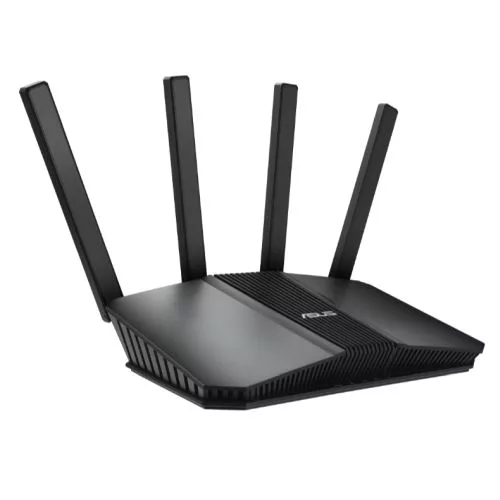
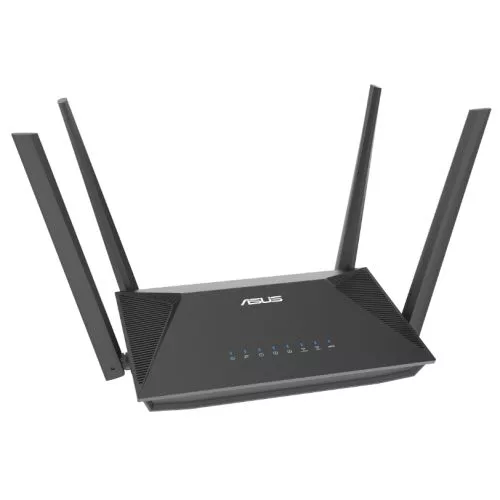
AX3000 Dual-Band WiFi 6 (802.11ax) All in One Access Point with Router, Switch and Security Gateway, supports up to 5 SSIDs, VLAN, SDN, customized guest portal, site-to-sit VPN, commercial-grade network security and easy management app
- Secure and Segmented Networking – Easy business WiFi network settings via Self-Defined Networks, and enhanced business security with VLAN support, offering up to five SSIDs for device segregation and prioritization in diverse business scenarios.
- Customizable Guest Portal – Guest portals can be tailored to meet your business needs, with custom portal types, branding and visual templates to fit particular business styles
- Backup WAN for Stable Connectivity –The USB port can be used as a backup WAN by connecting it to a mobile phone with hotspot to maintain a reliable internet connection
- Commercial-Grade Network Security and VPN – Safe Browsing, VPN features to connect easily and securely to public WiFi, and a free subscription to ASUS AiProtection Pro
- Accommodate to Any Space – The EBR63 comes with a built-in bracket and wall mount hole that can be adjusted to fit into almost any location for space-saving and more flexibility
Your Business WiFi Expert Within Reach
The ASUS ExpertWiFi EBR63 is an all in one access point with router, switch and security gateway functionalities. It offers a fast, secure, and scalable network with rich features tailored for small-to-midsized businesses. Whether used independently or integrated with other ASUS ExpertWiFi solutions, the EBR63 can easily adapt to your business network needs.
Speed up your business
A superfast business all in one access point for stable downloading and smooth video calls.
Connect your business to the max
4X greater dual-band network capacity with support for WiFi 6, which can lower latency when demand is high.
Start your business network with one device
Setting up a commercial network typically requires a significant investment in a complicated set of networking products and management fees. However, the ExpertWiFi EBR63 can empower you to easily build a cost-effective commercial network, making it an ideal choice for small businesses on a limited budget. Essential networking features are combined into one device, and we offer comprehensive software features without any subscription fees, so your business can get an edge on the competition. And as your business grows, you can easily extend your network with other ASUS ExpertWiFi products.
VLAN
ExpertWiFi supports virtual local area network (VLAN) management. VLAN management enables an easy, fast and flexible way to segment the network wired and wirelessly. You can dedicate an Ethernet port that provides additional security for your business.
Dual & backup WAN
The EBR63 provides reliable and stable internet access for business owners. With dual WAN support, you can set the USB port as a backup WAN by connecting it to your mobile phone with a hotspot. No complicated setup is needed — just plug it in and use it.
Easy settings for your business
Separate profiles and usage
A Self-Defined Network (SDN) provides up to five SSIDs to separate and prioritize devices for various business usages and network alternatives. Network segments can be made for employees, guest portals, guest networks, scheduled networks, IoT networks and VPN networks.
Scenario explorer
The scenario explorer can guide network novices through the network setup process. Just click on a scenario that suits your business the most, and it will customize your router’s settings to complete the process in just a few steps.
Create your style
Guest portals can be tailored to meet your business needs, with custom portal types, branding and visual templates to fit particular business styles and to engage with customers in different ways.
Manage all devices at once
ExpertWiFi series lets business owners with multiple offices or workplaces connect all network devices under one administrator account. In addition, they can easily manage various network devices in the ASUS ExpertWiFi mobile app anywhere, anytime.
Extendable and scalable
ExpertWiFi networking products are prepared to scale to the customer’s needs, whether it’s a small business or a medium-sized office. With support for up to 12 node connections, companies can significantly expand their network size by adding more ExpertWiFi devices. Additionally, the EBR63 can support up to 100 active devices.
Control your business network all in one app
With the ASUS ExpertWiFi app, you can set up and manage your business network easily and conveniently.
Commercial-grade network security
Site-to-site VPN
Site-to-site VPNs are useful for companies that prioritize private, protected traffic. They are particularly helpful for organizations that have multiple locations spread out over great distances, such as chain stores and overseas branch offices. Using a site-to-site VPN can quickly help you build up your private network to connect all these places and to share information or resources between intranets from different locations.
Protect your businesses
ASUS AiProtection Pro leverages powerful cybersecurity solutions and cloud data centers from Trend Micro ™ to shield your business and all connected devices from cyber threats — with no subscription fee!
One-tap security scan
Check your security level with one tap, instead of fiddling with complicated settings.
Multi-functional hardware
Adaptable to any space
The ExpertWiFi EBR63 comes with a built-in bracket and wall mount holes that can be adjusted to fit into almost any location for space-saving and more flexibility. The bracket also doubles as a cable organizer, making it easy to keep your workspace clean and organized.
Versatile connectivity
ASUS ExpertWiFi EBR63 features two USB ports, enabling easy connection of business devices like printers and POS machines for seamless resource sharing. Additionally, the USB ports can serve as a backup internet provider with your mobile hotspot, by just plugging it into your smartphone, ensuring an always-on business network.
Environmental Certification
ASUS ExpertWiFi is stringently tested to meet the requirements of world-leading sustainability certifications. These tests include a comprehensive database of up-to date criteria, independent verification and a structured system for continuous improvement.
Eco-friendly Packaging
All ExpertWiFi products come with environmentally friendly packaging sourced from FSC-certified responsible forestry, and they benefit from more active management of the use of chemicals in the production process, to improve the recycling of packaging and substances, and to reduce environmental impact.