

Description
AX4200 Dual Band WiFi 6 (802.11ax) AiMesh Router supporting free network security with AiProtection Pro, Safe Browsing, Instant Guard and VPN features, Parental controls, Easy setup, Wall mount
Experience fast and reliable WiFi all around your smart home with the RT-AX59U WiFi 6 router. It is fully backward compatible with previous WiFi standards and devices, so you can stay connected worry-free for all your internet activities.
- WiFi for Smart Homes – Ultrafast WiFi 6 router delivering up to 4,200 Mbps speed, with a powerful quad-core CPU for better efficiency to handle more devices
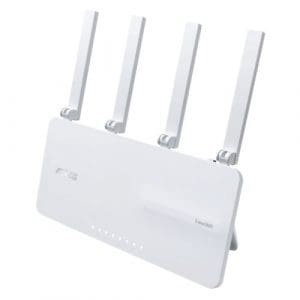
- Aesthetic and Functional Design – An innovative foot stand for both desktops and wall mount, and the ultra-minimalist design can fit into your home or business environments.
- One-Tap Safe Browsing – Block undesirable content with ASUS Safe Browsing, and protect your kids online by filtering explicit content from search results.
- Commercial-Grade Security Anywhere – Protect your home network with AiProtection Pro, powered by Trend Micro™. And when away from home, ASUS Instant Guard gives you a one-click sharable secure VPN.
- Easy Extendable Network – Enjoy seamless roaming with rich, advanced features by adding any AiMesh-compatible router.
Designed to Fit Your Style
Whether it’s a home or a café, on a desk or on a wall, all can enjoy the ultra-minimalist design of the RT-AX59U as it optimally blends with a wide variety of home interiors and business environments. The innovative foot stand can also serve as a wall-mount bracket for hassle-free installation.
Powerful WiFi 6 Performance
Enjoy unrivaled wireless performance across your smart home with the RT-AX59U dual band router. The powerful quad-core CPU and the WiFi 6 technology give it up to 4X more capacity for more devices. With support for 160 MHz channel bandwidth*, it delivers 3X** faster speeds and more reliable connectivity for all your high-bandwidth activities. The improved data transmission efficiency also reduces power consumption by up to 7X for better battery life of your devices
Easy Setup and Management
The RT-AX59U takes the pain out of managing your home network. It's easy to set up and keep an eye on what's happening, via the intuitive ASUS Router mobile app or the powerful web interface. There’s even more for you to explore, including complete VPN settings, parental control features, visualized connection diagnostics and much more.
Easily Extend Your WiFi Network
With ASUS AiMesh technology, it’s easy to combine multiple AiMesh-compatible ASUS routers to create a whole-home WiFi network with centralized control. You can even use a single SSID for your entire home or office network, with seamless coverage and dead zone elimination!
Subscription-Free Network Security
Complete Home WiFi Security
The ASUS RT-AX59U features AiProtection Pro, powered by Trend Micro™, with automatically updated protection from internet threats for all your connected devices and personal data.
One-Tap Safe Browsing
Tired of intrusive ads or inappropriate content on the internet? ASUS Safe Browsing* helps block undesirable content in one tap – no extra apps required! You can simply assign a security filter to your devices and block malicious content, advertisements or even explicit content from search engine results to protect your kids online.
Free Parental Controls
Gain insight into your kids’ online activity and customize settings for different age groups with the RT-AX59U’s robust parental controls – with no subscription fee. You can also flexibly schedule internet access with one click, or grant extra online time for your kids to reward their good behavior.
Make Free WiFi Secure Anywhere
When you are away from home, the ASUS Instant Guard mobile app gives you one-click secure internet access via your router*, thanks to its encrypted VPN tunneling technology. It can even let you easily share this private network connection with your family and friends through a URL link.
VPN for Home
Enjoy secure VPN connections to your favorite streaming services or games with the RT-AX59U. Through both the ASUS Router app and the web interface, you can easily manage your VPN connections, including OpenVPN and WireGuard, to meet more of your VPN scenarios. You can also run both a VPN and an ordinary internet connection simultaneously with VPN Fusion, without interfering with the browsing experience of other users.
VPN for Work
For remote workers, the built-in VPN features of the ASUS RT-AX59U provide quick and encrypted connections to corporate networks, without needing to install VPN software on each device.
Versatile Connectivity
In addition to gigabit WAN and LAN ports, the RT-AX59U also comes with two USB ports* for home media servers, easier file sharing, printer sharing and NAS storage. As a bonus, the RT-AX59U can provide backup network access when your internet services are inaccessible. You can set the USB port as a backup WAN by connecting it to a 4G/5G USB modem, or use your Android phone as a mobile hotspot.